
Central High School





HowToUseThisWebsite
The content of classmate profiles on this web site serves as a database for the class reunion committee. Please remember to keep your profile up-to-date with current contact information, and enjoy using this site as a portal to reconnect with old friends between graduating years.
Your Administrator: This website was created and is maintained by your classmate administrator, Dawn Stalbird Estep.
Married couples who share the same email address: One of you will need to create a unique email address to distinguish between individual profile messages sent to you. Gmail, a free email system via Google, is available HERE.
Email notifications from this web site: For those of you with spam blocking or email filtering capabilities with your email accounts, please add noreply@classcreator.net to your email account as a safe sender in order to receive email communication from this web site.
Privacy: All contact information that you enter into this website will be kept confidential. It will not be shared or distributed. Your contact information is private: your address and phone number can't be seen by the classmates unless you grant permission on your profile. When someone clicks on your name, all they will see of your contact information is your city and state and whatever information about yourself you choose to put on your web page. Your email address is not viewable, though an email can be sent to you using the contact box at the bottom of your web page. However, if you reply to or send a message to someone through their profile, they will see your email address so that they can respond. You have the option of password protecting your personal profile which blocks the general public and search engines from accessing your profile details.
Update Your Profile: If you change your email address, mailing address, or phone number, please update those details in your profile. We would like to keep our database as current as possible. Use the Edit Profile function under the Member Functions in the left navigation.
Forgot Password and Retrieval: If you click "Remember Me" when you log in, you will not need to log in next time you go to the site. Please Note: there is a password retrieval feature to click on ("Forgot Password?") in case you need to log in sometime and can't remember your password; the password will be sent to your email inbox. Click Here For Password Retrieval. You can login from computers other than your home computer but you will need to enter your password.
Trouble With Email and Password Log in: Your computer is not retaining cookies. A cookie is a little piece of data stored on your hard drive and is used by Class Creator to maintain the login system. Although cookie problems are rare, when they do occur you have several resolutions. Try any of the following:
- Make sure you are logged into your web site.
- Upgrade your browser to the most recent browser.
- Switch browsers. For instance if you are using Internet Explorer, try Firefox.
- Clear your Temporary Internet Files (cache) and clear your current cookies so you are starting fresh. Click here for instructions for clearing browser cookies.
- Make sure you are doing nothing to block cookies on the web site. Our login system depends on cookies working. If you are blocking cookies in general, you need to at least permit them for this web site so you can log in.
- Reboot your computer.
Aren't cookies bad? Answer: No. The "cookie scare" of the late 1990s was largely based on misconceptions that cookies stored on your computer's hard drive somehow violated privacy. Erroneous information regarding cookies has long since been corrected, and cookies are a common programming practice used today by some of the Internet's largest web sites. There is nothing Class Creator does with cookies that will in any way jeopardize your privacy, store personal information about you, or submit your personal information to other web sites.
How to upload pictures to your Profile:
1. Be sure you are logged in on the Home Page. In the links on the left side under MEMBER FUNCTIONS, click on the link: Edit/Upload Photos.
2. The Photo page will appear and you’ll see a gray box titled: Upload New photo. Click on this box and you will be at the Add Photo page.
3. The Add Photo page gives basic instructions for uploading your photos. There are 3 places on this page to make entries. Sort: The sort number controls the order in which photos display on your page. By default your pictures will appear in the order you entered them, so this isn’t important for your first picture. But later if you want picture #5 to appear as #1, you will have to change the sort numbers on your pictures. If you delete a picture, the sort numbers for the remaining pictures do not change (e.g., if you delete picture #2 out of 4 pictures, you will show pictures #1, 3, and 4.) Caption: Caption is the description you write for your picture. Browse: This is the most important one, for this is how you find the picture on your computer and get it to appear on your page.
4. Your first picture will automatically be Sort Number 1.
5. Now click the Browse button. A list of folders on your computer will show up. Locate the folder that holds your picture. For most classmates this will be the My Pictures folder located in the My Documents folder. When you have clicked through to your picture file, click the view button at the top to show icons as pictures. This makes it easier to find the specific picture you want to upload.
6. Select the picture you want to upload by clicking on it once, and then click Open at the bottom of the box.
7. Now you will be taken back to the Add Photo page and in the Upload Photo box you will see the path to your picture.
8. Enter the Caption for your picture in the box.
9. Click the SAVE CHANGES button. Now go to your Profile page and look for your picture and caption. Shortcut for multiple pictures: If you are uploading several pictures that are in different folders, you can copy them to your desktop, then delete them later. Make sure you COPY, not move, your pictures, so you won’t delete the original.If you are still having problems, please email me.
Always check back with the Home Page where information, announcements, and upcoming events will be posted.
Enjoy and have fun with the website!
Prayer Concerns: If you or your family have any prayer concerns, please email me and I will post them HERE. There will be an announcement at the top of the page when a new concerns is posted.
Results of the Post 30th Class Reunion Survey: Click HERE to see it!
Refer a Friend to ClassCreator: Do you know someone (spouse, friend, relative) who might be interested in starting a web site for their class reunion? If so, tell them to start it from our web site or click HERE and we will receive a $50 referral check for anyone who starts their own site from ours. This could go a long way in funding the Central High School 1979 web site. CHS Class of 1980 did just that! Check out their web site HERE.
Photo Slideshows: As you can see, we have 2 slideshows on our homepage, one of our 30th Class Reunion and one of our School Days at Central High School. If you have any photos that would be a nice addition to either of these slideshows, please email me and I will get them on here right away!
Recipe Share: We are in the process of collecting recipes to make the first-ever Central High School Class of 79 Cookbook! We need your recipes to make this a success. Your cookbook is free if you submit a recipe ~ plain and simple! If you have a story behind the recipe ~ I want that too! There are already lots of awesome recipes on there ~ Click HERE to see for yourself! Please send me your favorite recipes!
Read All About It!: This is a tab where classmates can share newspaper clippings, announcements, pictures and/or exciting stories with each other pertaining to themsleves, their families or pets. Please send any submissions my way! Newest addtitions will always be on the top. Click HERE to Read All About It!

Hodgepodge: This page consists of various stories, poems, funny jokes, etc. that are related to our era, compiled from some of our classmates and just down right funny! Please take the time to read these! The newest additions will always be on top!
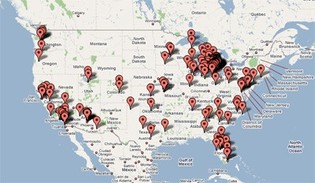
Where are they now: You can click on a link to your right and see a map where all our classmates are grouped by zip code. If you click on the satellite picture you will actually see the terrain on the map. Pretty cool feature!
As always, should you have any questions or need help with anything in here, please don't hesitate to email me at destep99@shentel.net or you can call my cell at 540.325.9633 and I'll be glad to help! :)